728x90
1. 코드작성
public enum ErrorLevel {
    LOW(Level.INFO, false),
    MEDIUM(Level.WARN, false),
    HIGH(Level.ERROR, true),
    CRITICAL(Level.ERROR, true);
}
- 에러레벨 ENUM으로 작성
if (level.isSlackNotify()) slackNotifier.send(e, request);- true일 경우 심각한 예외로 지정, slack에 메세지 전달
public class SlackNotifier {

    @Value("${slack.webhook.url:}")
    private String webhookUrl;

    private final RestClient restClient = RestClient.create();

    private static final DateTimeFormatter FORMATTER = DateTimeFormatter.ofPattern("yyyy-MM-dd HH:mm:ss");

    @Async
    public void send(Exception e, HttpServletRequest request) {
        if (webhookUrl == null || webhookUrl.isBlank()) {
            log.warn("Slack webhook URL이 설정되지 않아 알림을 보내지 않습니다.");
            return;
        }

        try {
            ErrorLevel level = (e instanceof BaseException be) ? be.getErrorCode().getLevel() : ErrorLevel.CRITICAL;
            String emoji = (level == ErrorLevel.CRITICAL) ? ":rotating_light:" : ":warning:";
            String mention = (level == ErrorLevel.CRITICAL) ? "<!channel> " : "";
            String errorCode = (e instanceof BaseException be) ? be.getErrorCode().name() : "INTERNAL_ERROR";

            String stackTrace = getStackTrace(e, 10);

            String payload = """
                    {
                      "blocks": [
                        {
                          "type": "header",
                          "text": {
                            "type": "plain_text",
                            "text": "%s [%s] 예외 발생"
                          }
                        },
                        {
                          "type": "section",
                          "fields": [
                            { "type": "mrkdwn", "text": "*Error Code:*\\n`%s`" },
                            { "type": "mrkdwn", "text": "*Level:*\\n`%s`" },
                            { "type": "mrkdwn", "text": "*URI:*\\n`%s %s`" },
                            { "type": "mrkdwn", "text": "*Time:*\\n`%s`" }
                          ]
                        },
                        {
                          "type": "section",
                          "text": {
                            "type": "mrkdwn",
                            "text": "*Message:*\\n```%s```"
                          }
                        },
                        {
                          "type": "section",
                          "text": {
                            "type": "mrkdwn",
                            "text": "*StackTrace:*\\n```%s```"
                          }
                        }
                      ],
                      "text": "%s%s [%s] %s"
                    }
                    """.formatted(
                    emoji, level,
                    errorCode,
                    level,
                    request.getMethod(), request.getRequestURI(),
                    LocalDateTime.now().format(FORMATTER),
                    escapeJson(e.getMessage()),
                    escapeJson(stackTrace),
                    mention, emoji, level, escapeJson(e.getMessage())
            );

            restClient.post()
                    .uri(webhookUrl)
                    .contentType(MediaType.APPLICATION_JSON)
                    .body(payload)
                    .retrieve()
                    .toBodilessEntity();

            log.info("Slack 알림 발송 완료 [{}]", level);
        } catch (Exception ex) {
            log.error("Slack 알림 발송 실패", ex);
        }
    }

    private String getStackTrace(Exception e, int maxLines) {
        StringWriter sw = new StringWriter();
        e.printStackTrace(new PrintWriter(sw));
        String[] lines = sw.toString().split("\n");
        StringBuilder sb = new StringBuilder();
        for (int i = 0; i < Math.min(lines.length, maxLines); i++) {
            sb.append(lines[i]).append("\n");
        }
        if (lines.length > maxLines) {
            sb.append("... ").append(lines.length - maxLines).append(" more lines");
        }
        return sb.toString().trim();
    }

    private String escapeJson(String text) {
        if (text == null) return "null";
        return text
                .replace("\\", "\\\\")
                .replace("\"", "\\\"")
                .replace("\n", "\\n")
                .replace("\r", "\\r")
                .replace("\t", "\\t");
    }
- 메세지 전송 포맷 설정 및 알림 보내기
2. Slack 워크스페이스 생성
1. https://slack.com/create 접속
2. 이메일 입력 → 인증코드 확인
3. 워크스페이스 이름 입력 (예: dkdk-team)
4. 알림용 채널 생성 (예: #서버-알림)
1. Slack App 생성 + Webhook 발급
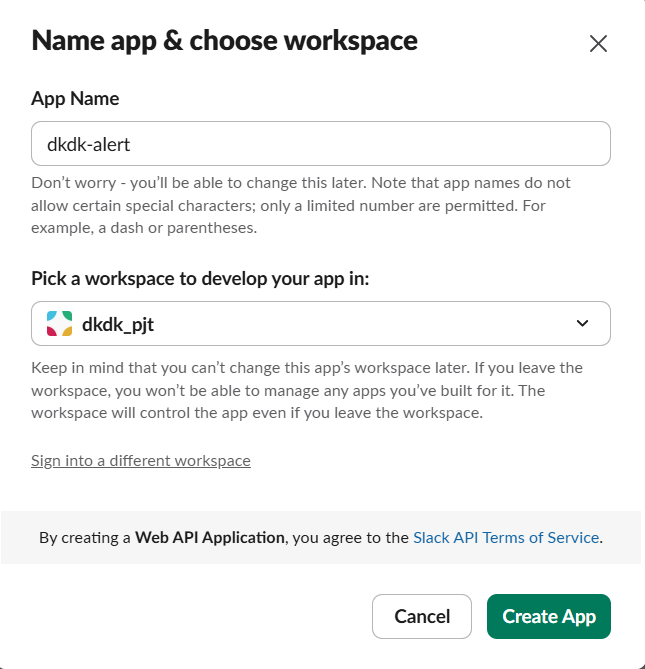
1. https://api.slack.com/apps → Create New App → From scratch
2. App 이름 입력 (예: dkdk-alert), 위에서 만든 워크스페이스 선택
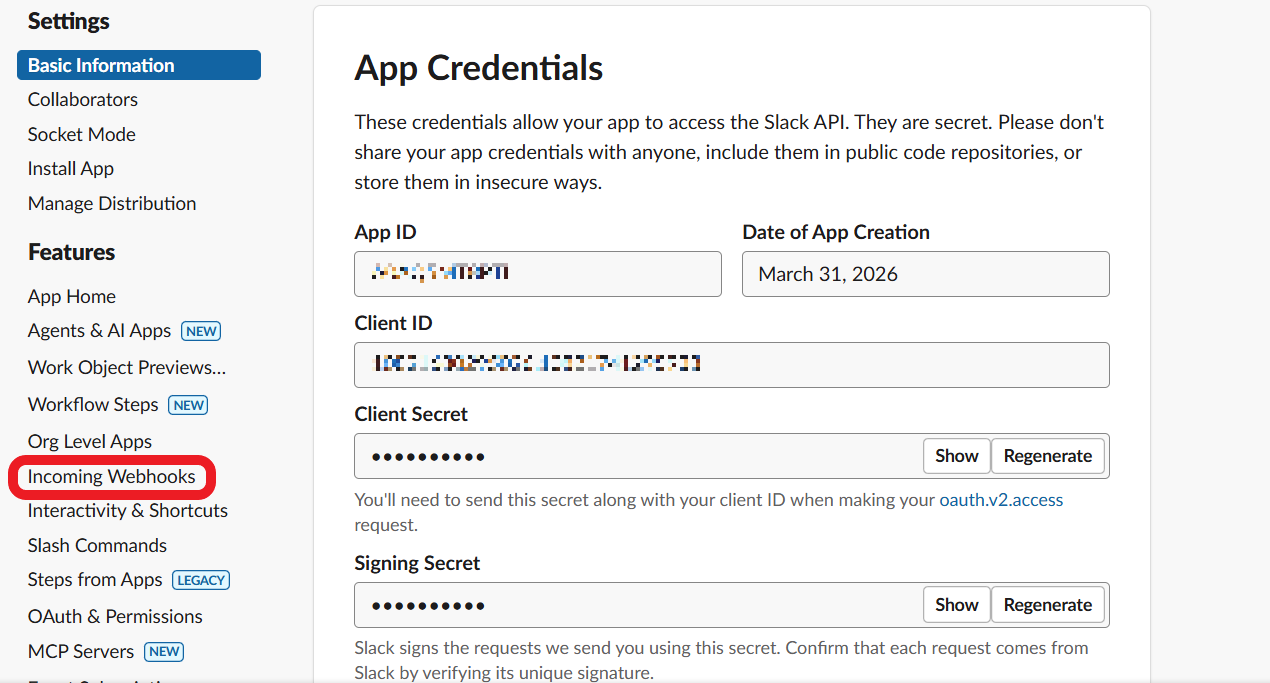
3. Incoming Webhooks → 토글 On → Add New Webhook


5. 생성된 Webhook URL 복사
6. 설정에 붙여넣기
slack.webhook.url=https://hooks.slack.com/services/T00000000/B00000000/XXXXXXXXXXXXXXXXXXXXXXXX
'Monitoring' 카테고리의 다른 글
| [MONITORING] Prometheus + Grafana + docker (0) | 2026.03.31 |
|---|